- Published
What headless WordPress means in practice
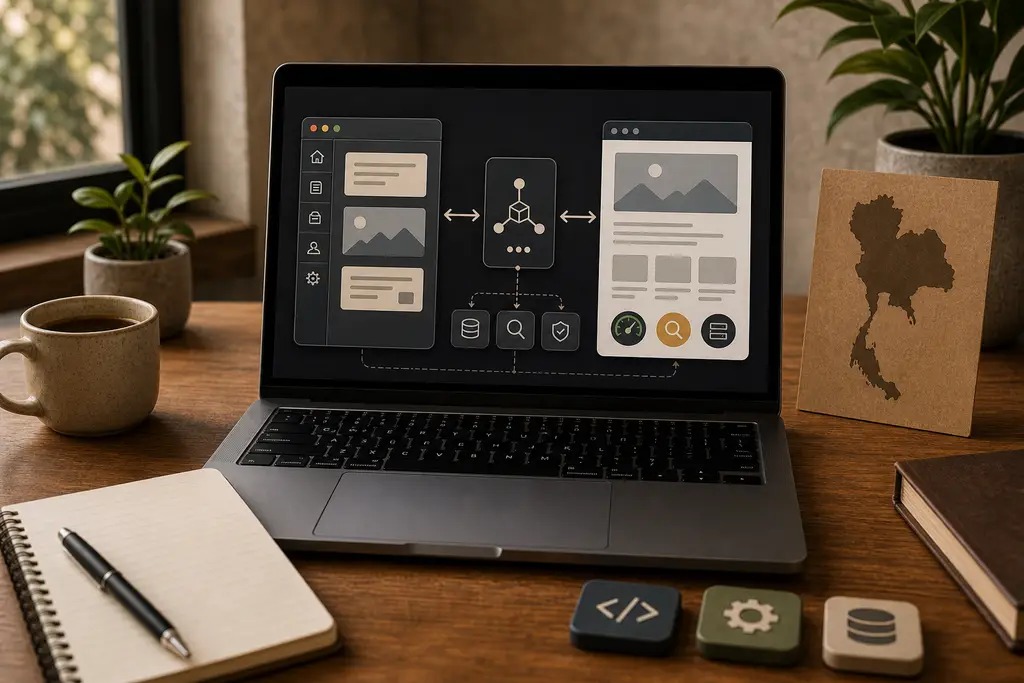
Headless WordPress means that WordPress is used for content editing, media, users, and publishing workflow, while the public website is rendered by something else.
Instead of a traditional WordPress theme producing the visible pages, a separate frontend such as Astro, Next.js, Nuxt, or a custom application fetches content from WordPress and builds the public experience.
For a Thailand business, that can be useful when the existing WordPress admin works well, but the public site needs a faster, cleaner, more controlled frontend for search, bookings, content structure, or long-term maintenance.
It is not automatically better than normal WordPress. It is a tradeoff.
The simple definition
In a normal WordPress site, WordPress handles both sides:
- The admin area where content is edited
- The public theme that visitors see
In a headless WordPress setup, those two responsibilities are separated:
- WordPress remains the CMS
- An API exposes approved content
- A separate frontend turns that content into pages
WordPress already includes a REST API for structured content access. Some projects use GraphQL through a plugin such as WPGraphQL instead. The practical choice depends on the content model, developer workflow, caching needs, and how much custom data must be exposed.
The important point is that WordPress is no longer responsible for rendering the public theme. It becomes the content backend.
Why businesses consider it
Headless WordPress usually comes up for one of four reasons.
First, the public site is too constrained by a theme or page builder. A villa rental website in Phuket, tour operator in Chiang Mai, or service business in Bangkok may need fast landing pages, structured destination content, booking paths, and better control than the current theme provides.
Second, the business wants better frontend performance. A static or server-rendered frontend can reduce unnecessary WordPress theme work, plugin output, and client-side clutter when it is built carefully.
Third, the team still wants WordPress editing. Editors may already understand posts, pages, media, custom fields, categories, drafts, and publishing status. Replacing the whole CMS may create more disruption than benefit.
Fourth, the site needs content in more than one place. The same WordPress content might feed a public website, app, booking interface, newsletter workflow, or internal tool.
Those are real reasons. “Headless” by itself is not one.
What changes technically
A headless setup changes the shape of the project.
The frontend now needs to handle routing, templates, metadata, images, internal links, sitemaps, redirects, forms, caching, previews, and deployments. WordPress still needs plugin updates, security, backups, content modeling, user permissions, and API behavior.
That means there are now two systems to maintain instead of one.
For a small Thailand business website, that can still be a good trade if the public site is important enough and the implementation stays simple. For example:
- WordPress for content editing
- Astro for static-first public pages
- Cloudflare for DNS, caching, redirects, headers, and edge delivery
- A small integration layer for contact forms, booking enquiries, or API data
This overlaps with the architecture described in Astro and Cloudflare for AI-ready Thailand websites, but WordPress becomes the structured content source instead of Markdown or MDX files.
SEO is not automatic
Headless WordPress can be excellent for technical SEO, but only if the frontend renders crawlable pages with stable URLs, useful metadata, clean headings, internal links, canonical URLs, image alt text, and a sitemap.
Do not make the mistake of moving to a JavaScript frontend and hiding important content behind client-side rendering. Google’s current JavaScript SEO guidance still points back to practical basics: make content and links available in rendered pages, test what search engines can see, and avoid fragile rendering assumptions.
For a Thailand-focused site, the content also needs the right market signal. A headless rebuild should not strip useful local context from pages about Bangkok services, Phuket villas, Chiang Mai tours, Thai hosting conditions, Southeast Asia delivery, or English-language content for expat-owned businesses.
If the current WordPress site already ranks, migration discipline matters. URLs, redirects, canonical tags, metadata, headings, internal links, schema, language alternates, and tracking should be mapped before launch. The broader website migration SEO checklist applies here.
When headless WordPress makes sense
Headless WordPress is worth considering when there is a clear reason for the extra architecture:
- The content team likes WordPress, but the public frontend needs tighter control
- The existing theme or page builder is slowing down important pages
- The site has structured content such as properties, tours, guides, locations, or documentation
- The public site can benefit from static generation, edge caching, or a cleaner component system
- The project needs content reused across more than one frontend
- The business can maintain both WordPress and the frontend deployment workflow
That can fit Thailand tourism, hospitality, real estate, service, and content-heavy businesses where public pages drive enquiries.
It can also fit a gradual modernization. The existing WordPress admin can remain familiar while the public frontend becomes faster and easier to reason about.
When normal WordPress is better
Headless WordPress is often the wrong answer for smaller websites that only need practical improvement.
If the site is slow because of images, hosting, plugins, database bloat, poor caching, or a heavy theme, start with a WordPress performance audit or a focused slow website review. Rebuilding the frontend may hide the original problem without fixing the operational habits that caused it.
Normal WordPress may be better when:
- The site is simple and the current theme is maintainable
- Editors depend heavily on visual page-builder workflows
- WooCommerce, memberships, forms, comments, or plugin-rendered features drive the business
- The budget does not support two systems
- Nobody will maintain previews, API changes, builds, and deployment checks
Headless should simplify the public website, not create a custom platform nobody wants to own.
The practical migration path
If headless WordPress might be useful, start small.
First, audit the current WordPress site. Identify content types, custom fields, taxonomies, media behavior, plugins, redirects, SEO metadata, search traffic, forms, and business-critical pages.
Second, choose one or two content types for a prototype. Do not rebuild the whole site before proving that the API exposes the right data and the frontend can render the right pages.
Third, decide how editing and preview will work. Editors need to understand when a change appears on the public site, how drafts are previewed, and what happens if a build fails.
Fourth, keep the operational parts boring: backups, staging, version control, deploy logs, rollback, cache invalidation, and clear ownership of WordPress plugins.
This is where staging for WordPress and PHP, custom WordPress plugin fixes, and reliable API integrations become relevant. Headless WordPress is not only a frontend decision.
Frequently Asked Questions
Is headless WordPress automatically better or faster than normal WordPress?
No. It is a tradeoff, not an automatic upgrade. It only helps when there is a clear reason for the extra architecture, such as a constraining theme, a structured content model, or a need to reuse content across more than one frontend.
Does going headless mean less maintenance work?
No, usually more. There are now two systems to maintain instead of one: the frontend needs routing, metadata, caching, and deployments, while WordPress still needs plugin updates, security, backups, and API behavior.
Is SEO automatically fine after moving to a headless frontend?
No. Headless WordPress can be excellent for technical SEO, but only if the frontend renders crawlable pages with stable URLs, useful metadata, internal links, and a sitemap. Hiding important content behind client-side rendering can undo the benefit.
Should a slow WordPress site go headless to fix performance?
Not usually as the first step. If the site is slow because of images, hosting, plugins, or a heavy theme, a WordPress performance audit or a focused slow-website review often fixes the real problem without the added complexity of a separate frontend.
My default recommendation
For most small business websites, I would not start by recommending headless WordPress. I would first check whether normal WordPress can be made faster, cleaner, safer, and easier to edit.
I would consider headless WordPress when the business has a real content model, a public site where speed and structure matter, and a clear reason to keep WordPress as the editor while replacing the frontend.
For Thailand businesses, that might mean a villa rental site with structured property pages, a tour company with destination and itinerary content, an expat-owned service business with detailed English guides, or an existing WordPress site where the admin is useful but the public layer has become too hard to maintain.
If you are considering headless WordPress for a Thailand-focused site, send me the current URL and what you want to improve. I can help decide whether headless WordPress is justified, or whether a more focused WordPress, Astro, Cloudflare, or performance cleanup would solve the real problem with less risk.